Pages

Showing posts with label Cash Management-EBS. Show all posts

Cash Forecasting - Cash Management


Cash forecasting is a planning tool that helps you anticipate the cash flow in and out of your business, allowing you to project your cash needs and evaluate your company's liquidity position.

In Oracle R12 you can forecast your cash position on the basis of transactions from subledgers. These transactions can be PO, PR, AP Invoice, AP Payment (Future Dated), AR Invoice, AR Receipt (Future Dated), and many more.

Process for Cash Forecasting in Oracle.

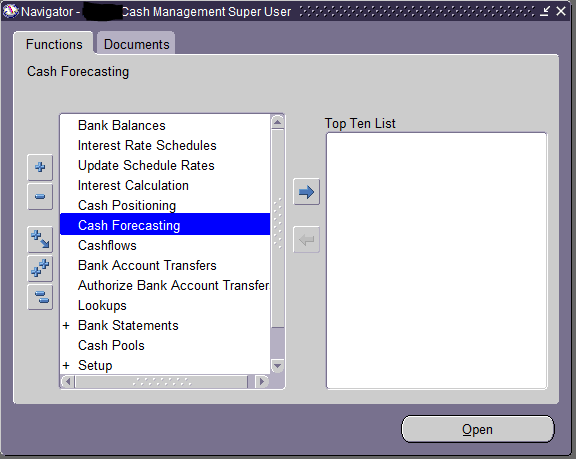
Step 1: Go to Cash Management Responsibility and Click on Cash Forecasting.


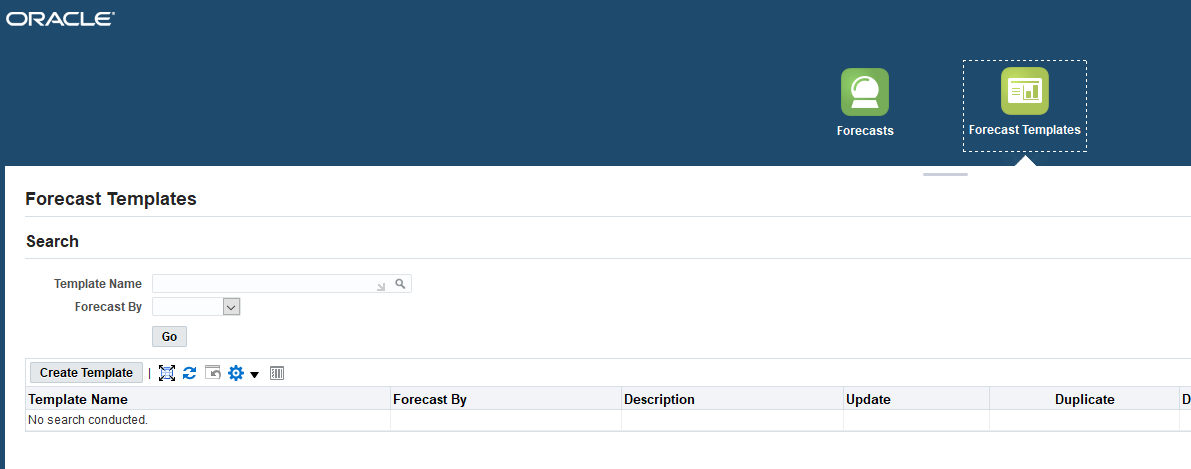
Step 2: Go to Forecast Template and click on Create Template


Enter all the details and click on the next


Here add the Source Type as per business requirements


Now as per the above steps add all the other sources as per business requirements.


Click on Next.

Now add the buckets which will tell you the inflow and outflow of cash as per the sources added above.


Click on Finish and then re-query your template.


Step 3: Click on Run Forecast as shown in the above image.

Now add the mandatory details and click on Submit.


After submitting, system will trigger 3 concurrent programs.


After completion of these 3 programs click on view forecast.


Now click on the Forecast Name Hyperlink to see the Cash Forecasting.


Here you can see the details of the Inflow and  Outflow of Cash as per sources selected in the forecast template.


Unable to Void a Payment. Void Button on Payments is Greyed Out.


Below are the reasons due to which Void Button is disabled on the Payment Workbench form.


1. Payment is Reconciled

When the status of the Payment is 'Reconciled' then the void button will be greyed out. To void a payment, first note the statement number from the show field from the payment then go to cash management and find the statement, and then unreconciled the payment. After this Void Button will be enabled.


2. Prepayment Application / Un-application


If the void button is disabled on a payment and that payment is of Prepayment Invoice then we need to make sure that prepayment is not partially or fully applied. Only after unapplying of prepayment from the invoice, you can void the payment. Until then the void button will be greyed out.


Query for Receipt Class and Receipt Method Form Data Extraction


SELECT 
ARC.NAME RECEIPT_CLASSES,
ARM.NAME ,
ARM.PRINTED_NAME,
ARM.START_DATE "EFFECTIVE DATES FROM",
HOA.NAME "OPERATING UNIT",
CEA.BANK_ACCOUNT_NAME,
CEA.BANK_ACCOUNT_NUM,
CEA.BANK_ACCOUNT_ID,
CEA.IBAN_NUMBER,
CEA.EFT_USER_NUM,
CBBV.BANK_NAME,
CBBV.BANK_BRANCH_NAME,
(SELECT CONCATENATED_SEGMENTS FROM GL_CODE_COMBINATIONS_KFV WHERE CODE_COMBINATION_ID=ARMAA.CASH_CCID)"CASH ACCOUNT",
(SELECT CONCATENATED_SEGMENTS FROM GL_CODE_COMBINATIONS_KFV WHERE CODE_COMBINATION_ID=ARMAA.ON_ACCOUNT_CCID)"ON ACCOUNT",
(SELECT CONCATENATED_SEGMENTS FROM GL_CODE_COMBINATIONS_KFV WHERE CODE_COMBINATION_ID=ARMAA.UNAPPLIED_CCID)"UNAPPLIED ACCOUNT",
(SELECT CONCATENATED_SEGMENTS FROM GL_CODE_COMBINATIONS_KFV WHERE CODE_COMBINATION_ID=ARMAA.UNEARNED_CCID) "UNEARNED ACCOUNT",
(SELECT CONCATENATED_SEGMENTS FROM GL_CODE_COMBINATIONS_KFV WHERE CODE_COMBINATION_ID=ARMAA.UNIDENTIFIED_CCID)"UNIDENTIFIED ACCOUNT",
(SELECT CONCATENATED_SEGMENTS FROM GL_CODE_COMBINATIONS_KFV WHERE CODE_COMBINATION_ID=ARMAA.FACTOR_CCID)"FACTORING",
(SELECT CONCATENATED_SEGMENTS FROM GL_CODE_COMBINATIONS_KFV WHERE CODE_COMBINATION_ID=ARMAA.BANK_CHARGES_CCID) "BANK CHARGES ACCOUNT",
(SELECT CONCATENATED_SEGMENTS FROM GL_CODE_COMBINATIONS_KFV WHERE CODE_COMBINATION_ID=ARMAA.RECEIPT_CLEARING_CCID) "RECEIPT CLEARING ACCOUNT"
FROM
AR_RECEIPT_CLASSES ARC,
AR_RECEIPT_METHODS ARM,
AR_RECEIPT_METHOD_ACCOUNTS_ALL ARMAA,
HR_ORGANIZATION_UNITS HOA,
CE_BANK_ACCT_USES_ALL CBAUA,
CE_BANK_ACCOUNTS CEA,
CE_BANK_BRANCHES_V CBBV
WHERE
1 = 1
AND 
ARC.RECEIPT_CLASS_ID = ARM.RECEIPT_CLASS_ID
AND 
ARM.RECEIPT_METHOD_ID = ARMAA.RECEIPT_METHOD_ID
AND 
ARM.END_DATE IS NULL
AND 
ARMAA.ORG_ID = HOA.ORGANIZATION_ID
AND 
ARMAA.REMIT_BANK_ACCT_USE_ID = CBAUA.BANK_ACCT_USE_ID
AND 
CBAUA.BANK_ACCOUNT_ID = CEA.BANK_ACCOUNT_ID
AND 
CEA.BANK_BRANCH_ID = CBBV.BRANCH_PARTY_ID
ORDER BY RECEIPT_CLASSES;